


Table of Contents
- Why Do We Need Custom Key-Value Pairs?
- The Tech Behind the Magic
- Setting Up Your Custom Pairs
- Real-World Examples
- Pro Tips for Getting Started
Why Do We Need Custom Key-Value Pairs?
Even the best AI occasionally stumbles over words. Do you know that moment when you’re dictating about “Dapagliflozin,” and your transcription comes back with something that looks like a cat walking across your keyboard? Yeah, we’ve all been there.
The Tech Behind the Magic
Here’s where it gets interesting. At Plexral Scribe, we use state-of-the-art transformer-based speech-to-text models that are specifically trained for medical transcription. These models are pretty impressive – they can handle different accents, medical terminology, and even that rapid-fire dictation style we all develop during busy clinic days.
But here’s the thing: even the smartest AI can get tripped up by words it hasn’t been trained on. This usually happens with:
- Medication names (especially newer ones)
- Patient names
- Local place names
- Specific medical facilities
That’s where our custom key-value pairs come in – think of it as teaching the AI your personal medical vocabulary.
Setting Up Your Custom Pairs
Let’s walk through how to set this up:
- Log in to your account at scribe.plexrallabs.com.au
- Navigate to the Custom Key-Value Pairs section
- You’ll see a simple interface with two fields:
- Key: What the AI might hear
- Value: What you actually said
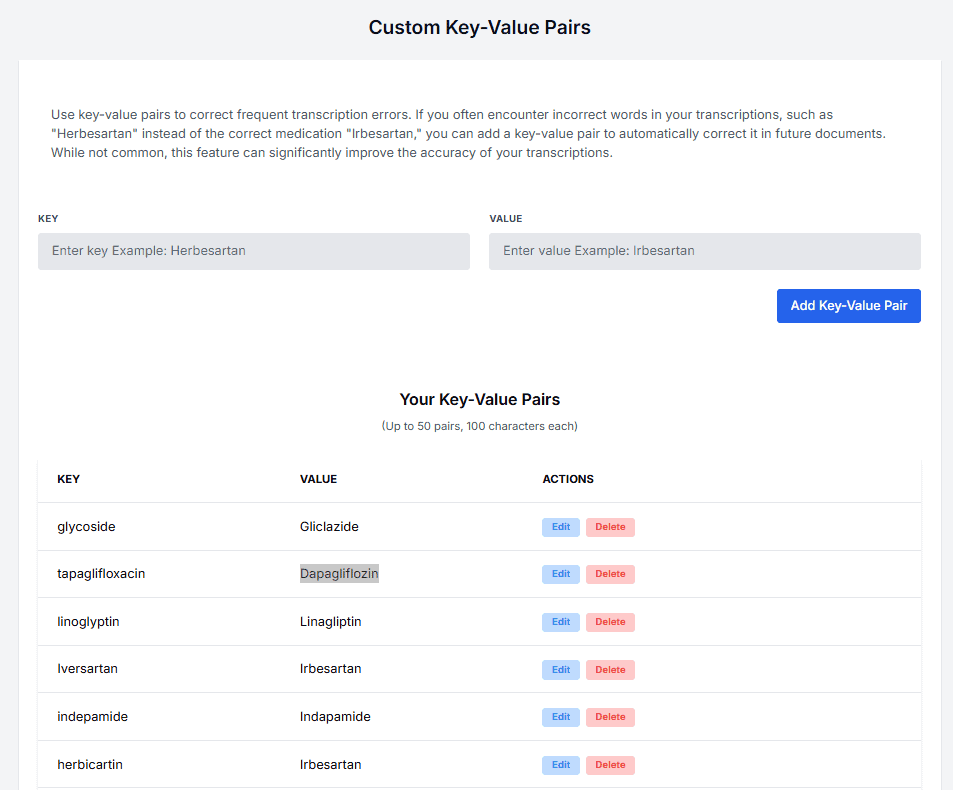
Each pair you create acts like a personal translation dictionary. You can add up to 50 pairs, and each key or value can be up to 100 characters long.
Real-World Examples
Here are some common replacements our users set up:
| Commonly Misheard | Correct Term |
|---|---|
| tapaglifloxacin | Dapagliflozin |
| glycoside | Gliclazide |
| linoglyptin | Linagliptin |
| herbicartin | Irbesartan |
Pro Tips for Getting Started
- Start Small: Begin with the medications you prescribe most often
- Track Mistakes: Keep note of common transcription errors for a week
- Local Places: Add your frequently mentioned local suburbs or medical centers
- Review Regularly: Update your pairs as you notice new patterns
Remember, this isn’t just about fixing errors – it’s about making your workflow smoother. Each correction you add is one less thing you need to worry about during your busy day.
The beauty of this system is its simplicity. You set it up once, and it works automatically every time. No more frustrating back-and-forth corrections or wondering if that medication name came through correctly.
Key-value pairs might seem like a small feature, but they’re one of those quality-of-life improvements that make a real difference in your daily practice. Because let’s face it – your time is better spent helping patients than correcting transcription errors.
Ready to make your transcriptions more accurate? Log in and set up your first key-value pairs today. Trust me, your future self will thank you!
Comments are closed